Every story has a moment where it lands. A pause, a change of mind, a single sentence that carries everything the film is actually about. Your job is to find that moment and build toward it. The footage has it. You know it’s in there.
The problem is everything between you and that moment: hours of material, timecodes written in documents nobody else can read, files you’ve watched twice and will watch again. This is work that consumes your time without requiring your judgment. Logging. Reviewing. Remembering. Searching for what you already know is somewhere in there.
AI has two possible relationships with that work. It can try to make the decisions for you — assembling a cut, proposing a structure, telling you what matters. Or it can do only the analytical labour, and leave every narrative decision exactly where it belongs: with you.
AVScript is built on the second idea. It transcribes, analyses, and tags your footage so that the material is searchable, navigable, and intelligible. What that material means — what story it carries, which moment is the one — that stays yours. AI clears the path. You decide where it leads.
It doesn’t matter whether you’re a documentary director, a journalist on deadline, a researcher logging interviews, or a producer building a brief for an editor. The problem is the same. The solution is the same.
Step One: Let Story AI Do the Logging
Before you can find anything, the footage needs to be analysed. You drop your files into AVScript, configure the pipeline, and run it. This is the only step that takes time — and you don’t have to watch anything.
You configure which stages to run. Transcribe alone is enough to make every spoken word searchable. Emotions AI and Visual AI add another layer on top — but even without them, you’ve just replaced hours of manual logging with a process that runs while you sleep.
For loggers: the logging is already done. Every word, every speaker, every timecode — indexed and searchable the moment the pipeline completes. Your job shifts from logging to curating.
Search: Stop Scrubbing
Once the pipeline runs, your footage becomes a searchable archive. Not “searchable” in a vague, approximate sense — fully searchable, by word, by speaker, by emotion, by topic.
Type a word and every file that contains it surfaces immediately — with the exact timecode, the surrounding sentence, and the AI tags that describe the emotional register of that moment. Click to play. No scrubbing, no file-hunting, no “I think it was somewhere in the second interview.”
You can layer filters: find everything tagged Emotion-Tension from Speaker A, or all segments tagged Topic-Decision across every file in the project. The entire archive responds to what you’re looking for, not just the file you happen to have open.
For journalists: your sources are now searchable. Every interview you recorded — this project, any project — has a full transcript. Search by topic, by name, by concept. Find the quote you need in seconds rather than re-watching the clip.
What You’re Looking At: The Full Feature Set
Once your footage is in AVScript, here’s what you have access to:
Text Video Editor: Cut by Editing Text
Of all the ways to interact with your material in AVScript, this one has the lowest barrier. You don’t need to know what a timeline is. You don’t need to think about clips or in/out points. You read, and you delete.
Open any transcribed file and you see the full transcript as editable text — every sentence a paragraph, every paragraph a selectable block. The video is synced to it: as your cursor moves through the text, the playhead follows. You’re reading and watching simultaneously.
When you find a line you don’t want in the cut, you delete it. Not the timecode — the actual words. The sentence disappears from the transcript. The corresponding clip is removed from the sequence. What remains is automatically assembled into a new cut.
Spk A “So, I mean, we had a lot of meetings about it. A lot of back and forth.”
Spk A “We knew it was the right call, but… I’m not sure I slept that week.”
Spk A “My co-founder kept asking me if I was okay. I told him I was fine.”
Spk A “There were nights I just couldn’t sleep. I kept thinking about what we were building.”
Spk A “We had another investor call that Friday — I honestly can’t remember what I said.”
Spk A “My kids asked me if we were going to be okay. That’s when I knew we had to move.”
Spk A “Anyway. We made the decision on a Sunday. I think it was a Sunday.”
The grey lines were deleted from the transcript. The blue lines stayed. The right side shows exactly what the cut looks like — playable, exportable as FCPXML.
This is the fastest path from raw interview to a structured selection, especially for people who think in sentences rather than timecodes. You’re essentially copy-editing your way to a rough cut. No timeline, no drag and drop, no clip handles. Just read, decide, delete.
Combined with Story AI chat: ask Story AI which lines it considers strongest, let it highlight them — then use the text editor to delete everything else. Raw footage to structured sequence in minutes.
Story AI: Ask Questions, Get a Cut
The most direct path from raw footage to a structured sequence isn’t always manual. Sometimes you know roughly what story you want to tell — you just need to ask.
Story AI chat works against your analysed footage. You ask questions in natural language. It responds with specific timecodes, direct quotes, and analysis of the material — not generic AI waffle, but answers grounded in what’s actually in your files.
And when you’re ready, you can ask it to propose a sequence. It suggests an ordered list of clips based on everything it knows about the material: the transcript, the emotions, the topics, the story arc you’ve described.
The peak tension moment is Speaker A at 00:31:05 – 00:31:19 in interview_A_day2.mp4 — “My kids asked me if we were going to be okay. That’s when I knew we had to move.” Emotion-Tension score hits 0.94 here, the highest across all files. It follows a quieter buildup from 00:28:40 that gives it significant contrast.
Here’s a suggested opening:
You can load this directly into the sequence builder, adjust it, or export as FCPXML.
The AI isn’t editing for you — it’s doing the analytical work so you can make faster decisions. You decide what to keep. The suggested sequence is a starting point, not a verdict.
For journalists on deadline: ask Story AI to find every moment where a specific topic came up across all your interviews, and order them by emotional intensity. In thirty seconds you have a shortlist that would have taken an hour of manual review.
Building the Story: From Fragments to Structure
This is the part that used to happen on paper, in a Google Doc, or not at all until you sat down with an editor and tried to explain what you had in your head.
In AVScript, you build the sequence directly. You’ve already searched your material and found the moments that matter. Now you pull them into order.
The current version of the sequence builder works with the dialogue track — interviews, narration, presenter pieces. B-roll placement is on the roadmap. What you’re building now is the verbal spine: the words, in the order they should be heard. That’s usually the hardest part anyway.
When you’re done:
- Preview the assembled sequence in AVScript — plays back your selected clips in order, exactly as they’ll be cut
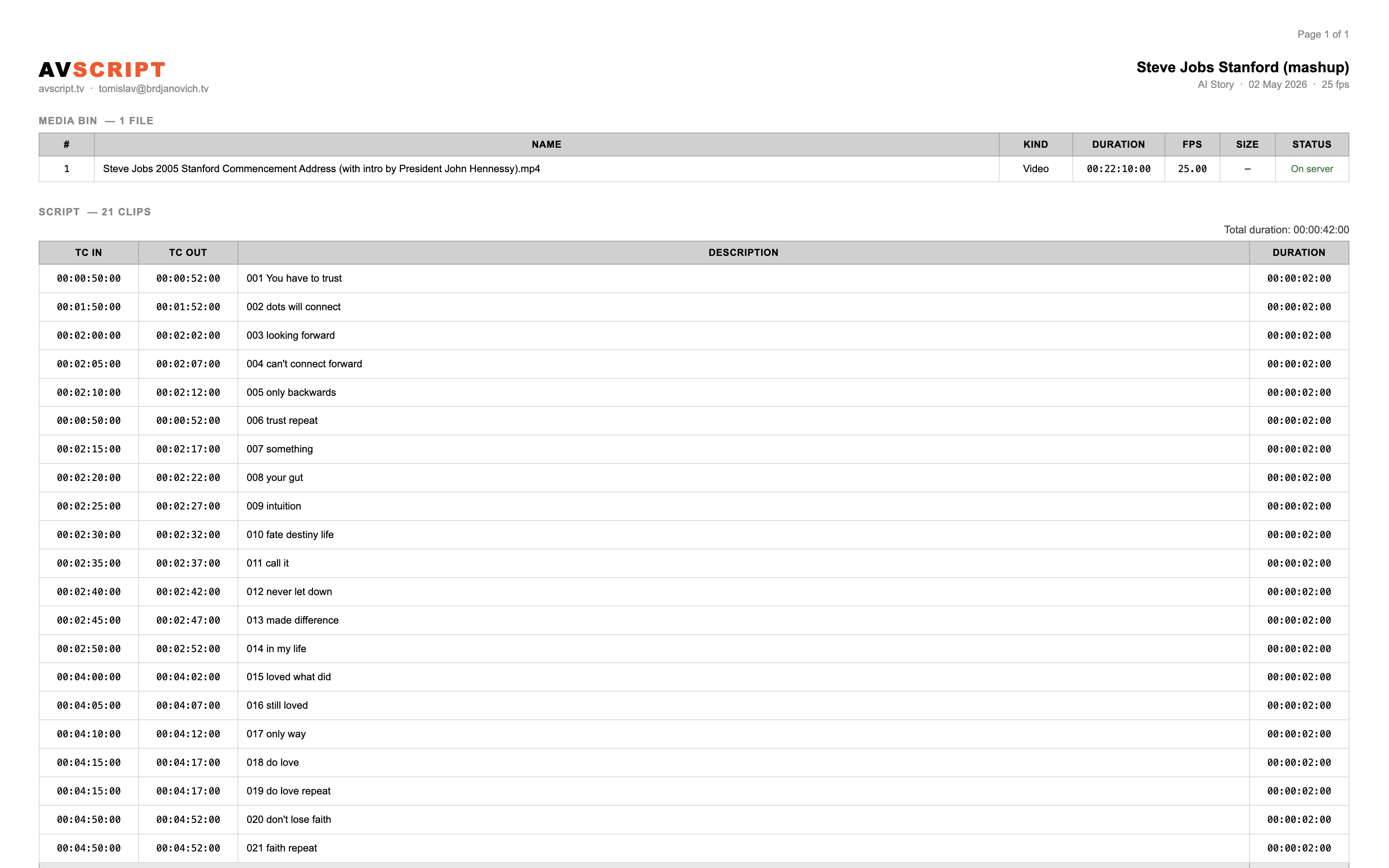
- Export a PDF script — professional paper cut format, with your asset list and every selected line at its exact timecode
- Export FCPXML — hand the entire sequence directly to your editor in Final Cut Pro
The PDF looks like this — a real document, the kind that has lived on edit suite desks for decades, now generated automatically from your sequence:
For researchers and loggers
You don’t have to build a sequence at all. AVScript’s value for you might be entirely in the search and the transcript — a fully logged, fully searchable archive of everything you’ve shot, built automatically, accessible from anywhere. You can share it with colleagues, run searches across months of material, and find any spoken word in any file without ever opening a sequence builder.Handing Off to the Editor
If there’s an editor in the chain, here’s what changes when you use AVScript.
The PDF gives them the roadmap. The FCPXML gives them the sequence ready to open. They’re not translating your feelings into a cut — they’re refining a structure you already built.
If the editor uses Final Cut Pro and you’ve set up MetaFlow, every source clip in their Library will also carry the captions, emotion keywords, and speaker labels from Story AI. The collaboration doesn’t end at the handoff — the intelligence travels with the footage into the edit.
For documentary directors: this is the paper edit reimagined. The old workflow — Betacam tapes, timecode logs, stacks of paper — existed because you needed to think through structure before you got into the edit suite. AVScript gives you that same discipline, digitally, with AI doing the logging work and the sequence builder replacing the paper.
One Script, Any NLE
Here’s something most storytellers don’t think about until they need it: your work in AVScript isn’t locked to any editing software.
Once the script and material are in AVScript — transcribed, analysed, sequenced — the output can go to whatever NLE the editor is working in. Final Cut Pro gets FCPXML 1.13 with full MetaFlow AI metadata. Premiere Pro gets a native XMEML file (File → Import, no Translation Report) with captions on the timeline and descriptions in the project bin. DaVinci Resolve accepts both. The PDF script is software-agnostic by definition. Whatever tool is on the other side, your structural work travels there intact.
This matters in practice more than it sounds. Productions change NLEs between projects. Co-productions involve editors in different studios with different setups. A news package might go to one editor; the long-form version to another who prefers Resolve. You build the story once in AVScript. The rest is routing.
We Won’t Charge You Twice for the Same Footage
This is a principle, not just a feature.
When Story AI processes a file — transcript, emotion scores, visual tags, speaker labels — that data is stored against the media file itself, permanently, not against the project. Delete the project, the data survives. Open the same file in a new project six months later, the data is there. Use the file in ten projects over three years, the analysis runs once and costs once.
We believe you should pay for work done, not work repeated. You invested in understanding your footage. That investment belongs to the footage, not to a session or a subscription cycle.
Run Story AI on an interview today. The transcript is available every time that file appears in any project you’ll ever make — immediately, with no re-processing, at no extra cost.
This matters most in ongoing work: a documentary shot over months, a news beat where the same sources recur, an institutional archive that grows over years. Each file is analysed once. Everything that analysis produced is yours forever.
Where to Start
If you’re new to AVScript, the fastest path to value is:
1 → Create a project, add your files to the bin.
2 → Run at minimum Transcribe through Story AI → Pipeline.
3 → Open the transcript viewer, click any word to jump to it.
4 → Use search to find a moment you’ve been trying to locate.
That’s it. Everything else — Emotions AI, Visual AI, sequence builder, PDF export, FCPXML handoff — builds on top of that foundation. Add stages as you need them.
The moment that makes the story land is already in your footage. AVScript’s only job is to help you reach it faster.
→ Start with your footage · → How Story AI works · → Handing off to an FCP editor